Domain 06 Cyber

In developmentCyber models are in development for businesses; the personal apps are available in preview on iOS and macOS.

The network is a front line too.

Defence AI models that learn your organisation’s normal: identities and sign-ins, company devices and platforms, leaks and data exposure, with one command to contain what gets through.

Two fronts, one defence

Your business, defended. And you with it.

Your company and the people in it, defended as one picture. AI watches and explains; one command contains the rest.

AI-native defence

Models that learn your organisation’s normal.

  • AI that watchesLearns what normal looks like for your company.
  • AI that explainsSays what happened, and what to do next.
  • AI against AICatches AI-written phishing, cloned voices and fake domains.
  • In developmentEarly access through a briefing.
  • 01Identity and sign-inEvery sign-in checked: who, where, on what device.
  • 02Company assetsDevices, domains and cloud accounts, as one estate.
  • 03PlatformsSites, apps and services, watched for weak points.
  • 04ExposureStaff credentials and domains checked against new leaks.
  • 05ResponseOne switch pauses new sign-ins and narrows remote access to known devices.

Security assessment

How protected are you today?

Ten checks, a private score and a clear next step. Your answers never leave your browser.

Start the assessment

Everything a company runs on, defended.

  • 01

    Identity and authentication

    Sign-ins, recovery changes and two-step coverage across every account, with risky access paused before it spreads.

  • 02

    Company assets and devices

    Laptops, phones, servers and domains mapped as one estate, with the gaps shown plainly.

  • 03

    Platforms and cloud

    Websites, apps and cloud accounts watched for exposed services, weak settings and change.

  • 04

    Leak and breach watch

    Company domains and staff credentials checked daily against leak indexes and breach directories.

  • 05

    Phishing and malicious files

    Lures, look-alike domains and disguised files caught before someone opens them.

  • 06

    Incident response

    Lock Down pauses new sign-ins, narrows remote access to known devices and alerts the security team, from any screen.

How a business gets started

  1. 01BriefTell us what you run and who you answer for.
  2. 02MapWe map your accounts, devices, domains and platforms.
  3. 03ConnectVamocles connects to what you already use.
  4. 04CommandYour team sees one picture and acts from any screen.
Request a briefing

Monitor

Watch the dark corners.

Add the domains and organisations you care about. Monitor checks leak indexes, breach directories and certificate logs every day, and tells you when something new shows up.

  • LeakIXOpen databases and exposed services tied to your domain. It uses a free API key, kept in the Keychain.
  • Have I Been PwnedBreaches that named your domain, from the public breach directory.
  • Certificate transparencyNew hostnames, look-alikes and shadow IT, from certificates issued in the last 30 days.

Monitor reads public indexes only. It never logs in anywhere and never touches the systems it reports on.

How Monitor works
Monitor Ready to check

Watching

  • p7-operator.exampleDomain
  • P7 OperatorOrganisation

Sources

  • LeakIXReady
  • Have I Been PwnedReady
  • Certificate transparencyReady

Exposures

Nothing checked yet. Press Check now.

InfoMediumHighCritical

Breaches rate Critical above 10M accounts and High above 1M.

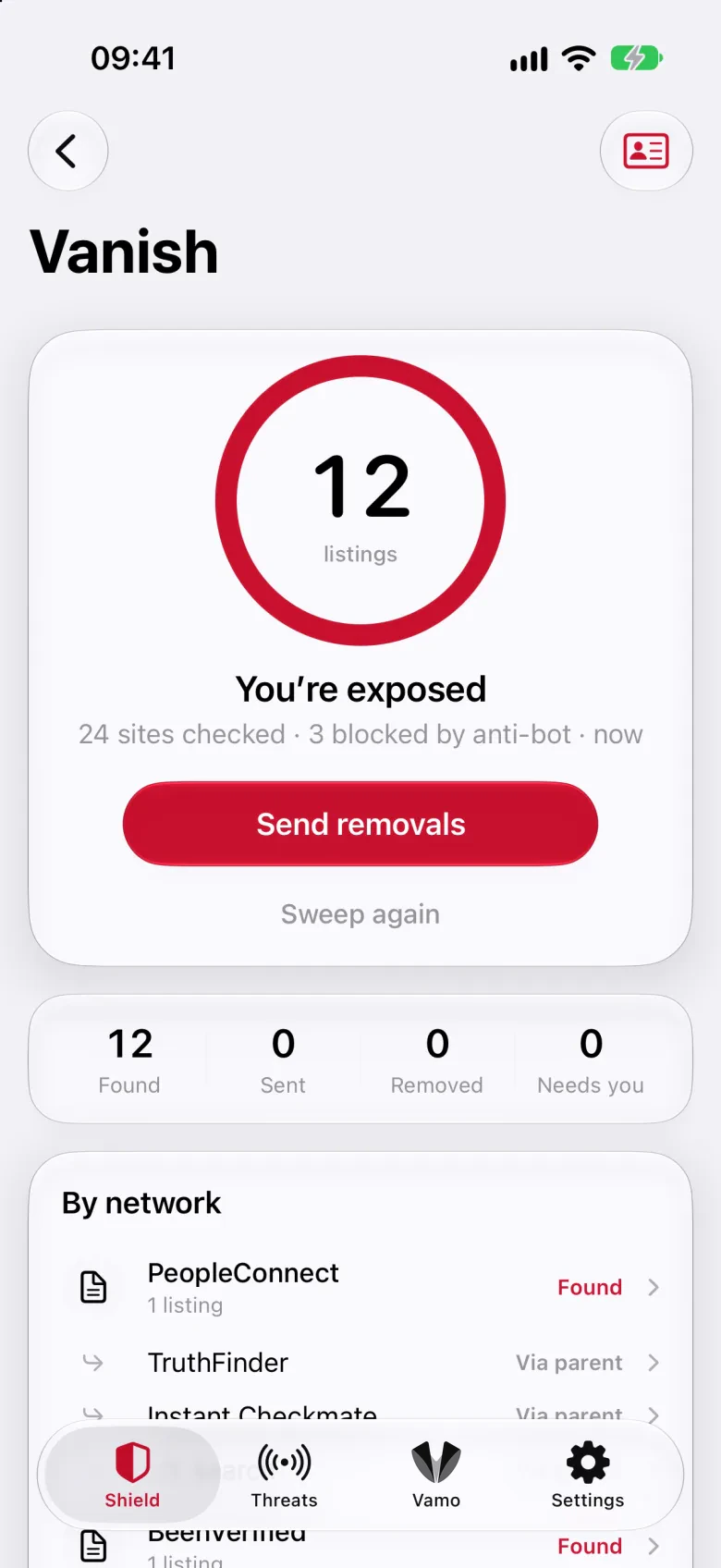
The Vanish screen in the Vamocles app: listings found across people-search sites, a Send removals button and results grouped by network The Vanish screen in the Vamocles app: listings found across people-search sites, a Send removals button and results grouped by network

Vanish

Find where you’re exposed.

Vanish searches 24 of 38 people-search and data-broker sites for your name, then prepares official removal requests you send with one tap each.

  1. 01

    Discover

    A listing counts only when it shows your first and last name plus a city or phone number you gave Vanish.

  2. 02

    Send

    Each request goes through the broker’s official channel: a web form, an email or a portal. One tap each. Nothing is sent without you.

  3. 03

    Verify

    A weekly re-scan looks again. A listing is marked removed only when the re-scan proves it has gone.

How Vanish works

The roster

38 sites, parents first.

Four parent networks feed many of the others, so Vanish starts with them and follows the sites they supply.

  • PeopleConnectIntelius, TruthFinder, Instant Checkmate, US Search, ZabaSearch
  • BeenVerifiedPeopleLooker, PeopleSmart, NeighborWho, Ownerly, NumberGuru, Bumper
  • Whitepages411.com
  • SpokeoIts own listings

Then Radaris, TruePeopleSearch, FastPeopleSearch, FamilyTreeNow, Nuwber, PeopleFinders and the rest of the roster.

The right law

Worded for where you live.

Vanish chooses the legal wording from your country and region, so each request cites the right to deletion that applies to you.

Requests will cite

GDPR Article 17

The right to erasure, with an Article 21 objection and the one-month reply deadline of Article 12(3).

  • Consent on recordRecorded with a timestamp before the first sweep.
  • Kept on the deviceYour identifiers live in the Keychain.
  • No government IDNever passport, licence, tax or social security numbers.
  • Your tap, every timeNothing is sent silently.

File analysis on the Mac

Checked before it runs.

Drop a file, a folder or an app on the notch, or on the Scan page, and Vamo checks it on your Mac.

See it in the notch on the Command page

Seven checks, on the machine.

ThreatReviewNote

  1. 01

    Code signatures

    Apps are validated with Apple’s Security framework. Unsigned or modified apps are flagged. A signed app not yet opened on this Mac gets a note.

    Review
  2. 02

    Disguised executables

    A name like Invoice.pdf.command looks like a document but runs as a program. A common malware lure.

    Threat
  3. 03

    Windows executables

    Files such as .exe, .scr or .msi can’t run on a Mac, but they are a common lure. Don’t forward them.

    Review
  4. 04

    Scripts from the internet

    Shell, Python and AppleScript files that arrived with the quarantine flag. Read them before running; scripts run with your permissions.

    Review
  5. 05

    Installers

    Packages and disk images from the internet. Verify the publisher before installing.

    Note
  6. 06

    Archives

    Zip, rar and similar files. Their contents aren’t inspected: extract them and drop the folder.

    Note
  7. 07

    Hidden executables

    Hidden files that can run are unusual in user folders, so they are always raised.

    Review
  8. Nothing leaves your Mac. Folders are walked on the machine, skipping build folders such as node_modules and .git. No upload, no cloud sandbox, no waiting.

How it behaves

Trusted with the people it protects.

Security software sees more of a person than almost anything else they use.

38people-search and data-broker sites in the Vanish roster
3public sources Monitor checks: LeakIX, the breach directory and certificate logs
7checks run on the Mac for every file, folder and app you drop
0files uploaded during analysis

Reads, never logs in

Monitor reads public indexes. It never signs in to anything and never touches the systems it reports on.

Your tap, every time

Nothing is sent on your behalf without your tap or click, and consent is recorded with a timestamp.

No government ID

Vanish never asks for a passport, licence, tax or social security number.

Keys in the Keychain

Vanish identifiers and the LeakIX key live in the device Keychain, never in plain settings.

On the device first

Files are analysed on the Mac. Speech is recognised on the device where it is supported.

Defensive only

Everything here watches, warns and removes. None of it reaches into anyone else’s systems.

How we protect what we hold